
Use a WTS (Want to Sell) broadcast when you have UAV or robotics components available for sale.
You can include one or multiple components in a single broadcast.
How to Create a WTS Broadcast #
- Go to Broadcasts.
- Click Create Broadcast.
- Select WTS – Want to Sell.
- Add the components you want to offer.
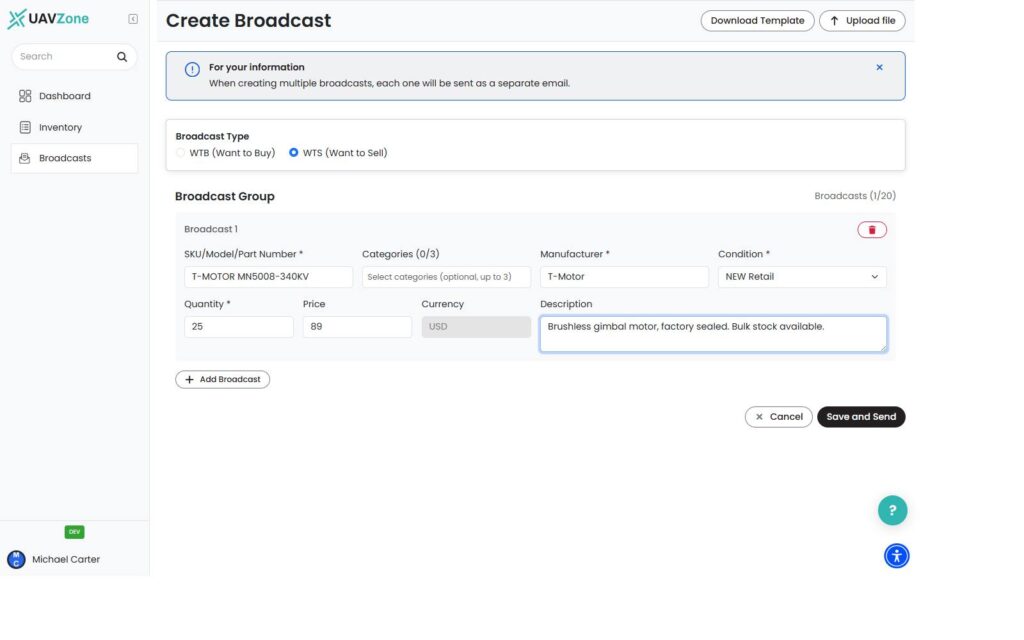
You can add items from your inventory or enter them manually.
For each item, provide the relevant details:
- SKU / Part Number or Model
- Category
- Manufacturer
- Condition
- Quantity
- Price
- Description
Available condition options include:
- New Retail
- New Bulk
- Refurbished
- Used
- As-Is
To add another component, click Add Row.
When your broadcast is ready, click Save and Send.
Your WTS broadcast is sent immediately and will appear under My Broadcasts and in the marketplace.
Important #
Before creating a broadcast, make sure your Company Profile is complete. Your company name and phone number are required.
There is currently no draft mode. Clicking Save and Send publishes the broadcast immediately.
What Happens Next? #
Companies looking for relevant components can discover your WTS broadcast and view the item and company details.
When another company responds, UAVZone connects the relevant parties by email.
From there, you communicate directly and complete the transaction outside the platform. UAVZone does not process payment or shipment.


