
Use a WTB (Want to Buy) broadcast when you’re looking for a specific UAV or robotics component.
A WTB broadcast lets you share your requirement with companies across the UAVZone marketplace.
How to Create a WTB Broadcast #
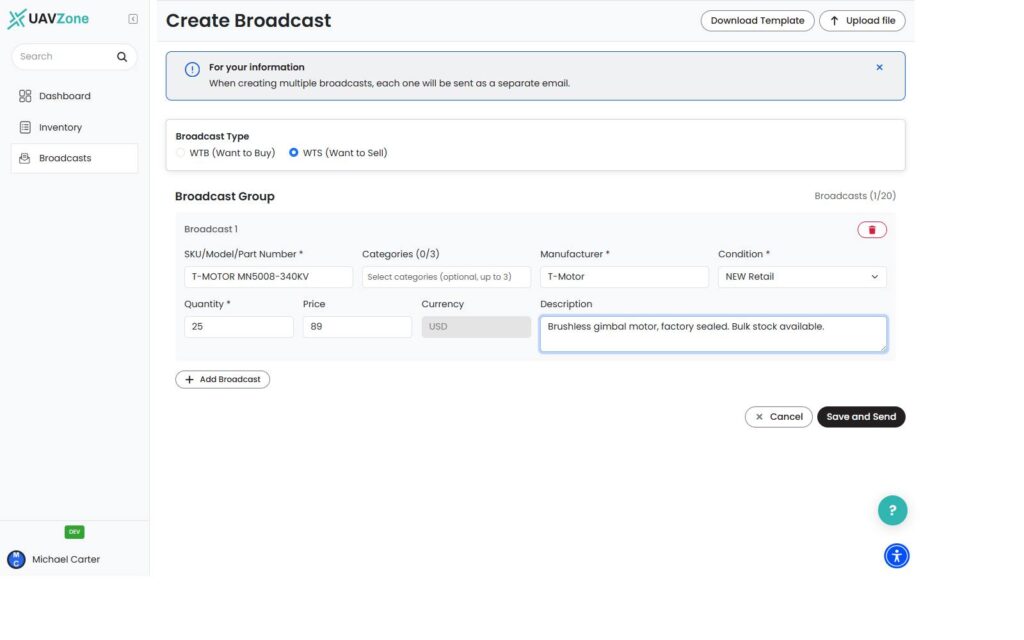
- Go to Broadcasts.
- Click Create Broadcast.
- Select WTB – Want to Buy.
- Enter the component details:
- SKU / Part Number or Model
- Category
- Manufacturer
- Condition
- Quantity
- Description
- Click Add Row if you want to include additional components in the same broadcast.
- When you’re ready, click Save and Send.
Your broadcast is sent immediately and will appear under My Broadcasts and in the marketplace.
Important #
Your Company Profile must be completed before you can create a broadcast. Your company name and phone number are required.
There is currently no draft mode. Clicking Save and Send publishes the broadcast immediately.
What Happens Next? #
Other companies can discover your WTB broadcast through the marketplace.
When a company responds to your broadcast, UAVZone connects the relevant parties by email so you can continue the conversation directly.
The transaction itself takes place directly between the companies, outside UAVZone.


