Skip to content
  • Home
  • About Us
  • FAQ
  • News
  • Contact Us
  • Home
  • About Us
  • FAQ
  • News
  • Contact Us
Enter Marketplace
  • Home
  • About Us
  • FAQ
  • News
  • Blog
  • Sign in
  • Sign up
  • Contact Us
  • Home
  • About Us
  • FAQ
  • News
  • Blog
  • Sign in
  • Sign up
  • Contact Us

Getting Started

7
  • Welcome to UAVZone
  • Sign in
  • Create your account
  • Verify your email
  • Complete your company profile
  • Complete your profile
  • Your Dashboard Overview

Inventory

5
  • Archive Products
  • Product status
  • Edit inventory
  • Bulk upload (Excel)
  • Add a product

Broadcasts

3
  • Create WTS Broadcasts
  • Create WTB Broadcasts
  • Manage Broadcasts

Marketplace

4
  • Request a Quote
  • Favorites & Alerts
  • Contact suppliers
  • Search products

Account

4
  • Security
  • Team members
  • Subscription
  • Notifications

FAQ

1
  • Common questions

Video Tutorials

1
  • Short how-to videos

Billing

1
  • Billing & Pricing
View Categories
  • Home
  • Docs
  • Broadcasts
  • Create WTS Broadcasts

Create WTS Broadcasts

1 min read

Use a WTS (Want to Sell) broadcast when you have UAV or robotics components available for sale.

You can include one or multiple components in a single broadcast.

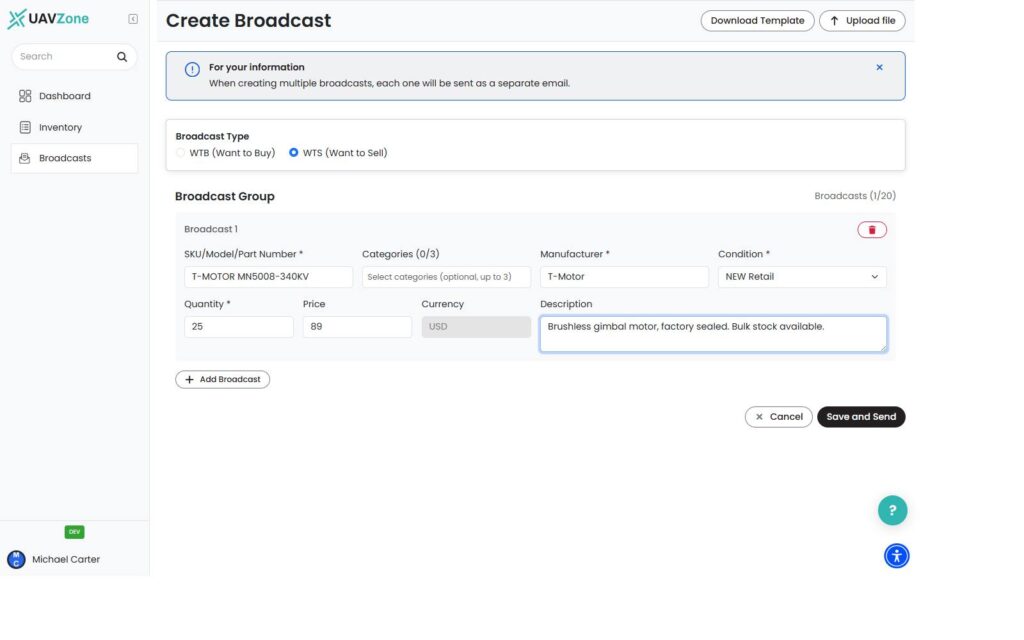
How to Create a WTS Broadcast #

  1. Go to Broadcasts.
  2. Click Create Broadcast.
  3. Select WTS – Want to Sell.
  4. Add the components you want to offer.

You can add items from your inventory or enter them manually.

For each item, provide the relevant details:

  • SKU / Part Number or Model
  • Category
  • Manufacturer
  • Condition
  • Quantity
  • Price
  • Description

Available condition options include:

  • New Retail
  • New Bulk
  • Refurbished
  • Used
  • As-Is

To add another component, click Add Row.

When your broadcast is ready, click Save and Send.

Your WTS broadcast is sent immediately and will appear under My Broadcasts and in the marketplace.

Important #

Before creating a broadcast, make sure your Company Profile is complete. Your company name and phone number are required.

There is currently no draft mode. Clicking Save and Send publishes the broadcast immediately.

What Happens Next? #

Companies looking for relevant components can discover your WTS broadcast and view the item and company details.

When another company responds, UAVZone connects the relevant parties by email.

From there, you communicate directly and complete the transaction outside the platform. UAVZone does not process payment or shipment.

Updated on September 15, 2026

What are your Feelings

  • Happy
  • Normal
  • Sad

Share This Article :

  • Facebook
  • X
  • LinkedIn
  • Pinterest
Manage BroadcastsCreate WTB Broadcasts
Table of Contents
  • How to Create a WTS Broadcast
  • Important
  • What Happens Next?
  • Home
  • About Us
  • FAQ
  • News
  • Blog
  • Contact Us
  • Home
  • About Us
  • FAQ
  • News
  • Blog
  • Contact Us
  • Sign in
  • Sign up
  • Sign in
  • Sign up
Linkedin X-twitter Youtube Instagram Facebook

By using UAVZone website and Platform, you agree to our Terms of Use and have read our Privacy Policy.

© Copyright UAVZone
Manage Consent
To provide the best experiences, we use technologies like cookies to store and/or access device information. Consenting to these technologies will allow us to process data such as browsing behavior or unique IDs on this site. Not consenting or withdrawing consent, may adversely affect certain features and functions.
Functional Always active
The technical storage or access is strictly necessary for the legitimate purpose of enabling the use of a specific service explicitly requested by the subscriber or user, or for the sole purpose of carrying out the transmission of a communication over an electronic communications network.
Preferences
The technical storage or access is necessary for the legitimate purpose of storing preferences that are not requested by the subscriber or user.
Statistics
The technical storage or access that is used exclusively for statistical purposes. The technical storage or access that is used exclusively for anonymous statistical purposes. Without a subpoena, voluntary compliance on the part of your Internet Service Provider, or additional records from a third party, information stored or retrieved for this purpose alone cannot usually be used to identify you.
Marketing
The technical storage or access is required to create user profiles to send advertising, or to track the user on a website or across several websites for similar marketing purposes.
  • Manage options
  • Manage services
  • Manage {vendor_count} vendors
  • Read more about these purposes
View preferences
  • {title}
  • {title}
  • {title}
  • Home
  • About Us
  • FAQ
  • News
  • Blog
  • Sign in
  • Sign up
  • Contact Us
Sign up